Automations
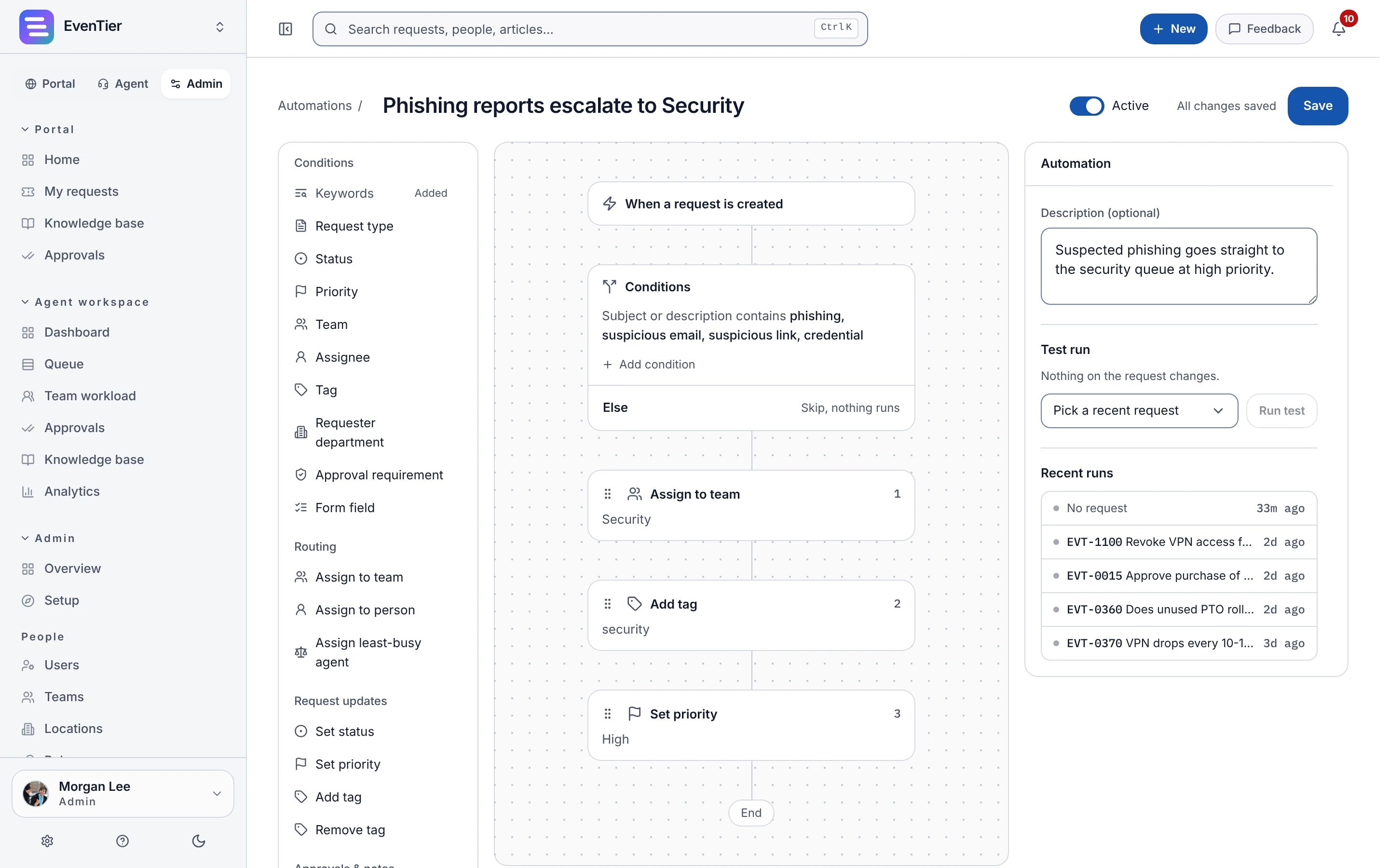
Build rules on a drag-and-drop canvas from a trigger, the conditions a request must meet and the steps to run. Choose from 6 triggers and 12 actions, and test a rule on a recent request before it goes live.
Triggers and conditions
A rule starts when a request is created or updated, gets a comment, changes status, has an approval decided, or reaches an age you set. Conditions narrow it to the requests it is for.
- Keywords in the subject, description or requester email, with exclusions
- Request type, status, priority, team, assignee, tags and custom field values
- The requester's department, and whether approval is required
- Try a keyword condition against sample text before you save it
If and Else paths
Requests that meet the conditions run the steps on the If path. The rest run the Else path, or nothing when it is empty, so one rule can route urgent requests one way and everything else another.
- Assign an agent, a team, or the least busy agent on a team
- Set the status or priority, add or remove tags, or add an internal note
- Create an approval, or send a notification or an email
- Call a webhook, which sends a signed POST to your own endpoint
Run order and run history
Active rules run from the top of the list down, and you drag a rule to move it. Once a rule is on, its run history shows what it did.
- Each run is logged as Success or Failed, with a link to the request it changed
- A rule never re-runs on a change its own steps caused
- When rules set each other off, the chain stops after five
More in Automations
Templates
Start from templates for payroll routing, phishing escalation, urgent alerts and offboarding webhooks, then edit them on the canvas.
Time-based rules
Run a rule when a request reaches an age, counted from when it was created, last updated or last changed status. For example, close resolved requests after a week.
Keyboard support
Press Enter to add a step and use the keyboard to reorder steps. To move a step to the other path, choose Move to Else or Move to If from its menu.
Included in every plan.See pricing →
Questions about Automations
- Do we need to write code?
- No. Rules are built on the canvas. For a step EvenTier does not offer, the Call a webhook action sends a signed request to your own script.
- What happens when a step fails?
- The rule stops at that step. Steps before it stay applied, nothing after it runs, and the run is recorded as Failed in the rule's history.
- Can two rules fight over the same field?
- Rules run in list order, so when two change the same field, the lower rule's change wins. Put catch-all rules at the top and specific rules below them.
Documentation
- AutomationsBuild rules on a drag-and-drop canvas from six triggers and twelve actions, with an Else path for requests that do not match the conditions. Route, tag, notify, and call webhooks.
- WebhooksSend four request events to a URL in your own system. Every payload is signed with HMAC SHA-256 so your receiver can check it came from EvenTier.
Related
- Requests and portalIntake forms, the employee portal and the agent queue
- ApprovalsOne approver or an ordered chain, with delegation
- SLAsResponse and resolution targets on business hours
- Internal IT help deskIntake, routing, SLAs, approvals, assets, and audit for the team that fields hardware and access requests.
- Approval workflowsApproval before access is granted, hardware is ordered, or onboarding completes, with delegation and an audit log entry per decision.
Try it with your own data
Create a workspace and set it up with your own teams, request types and settings.